
Intelligent AP Execution for SAP
From document totrusted SAP transaction
DocuSync takes a supplier invoice from the inbox to a posted S/4HANA document. It reads it, validates it, reconciles it against the purchase order and goods receipt, surfaces what needs a decision, and posts what your approver signs off.
The execution chain
- 01Read
- 02Validate
- 03Reconcile
- 04Resolve
- 05Post
Built on
- SAP BTP
- SAP CAP
- SAP Document Information Extraction
- S/4HANA
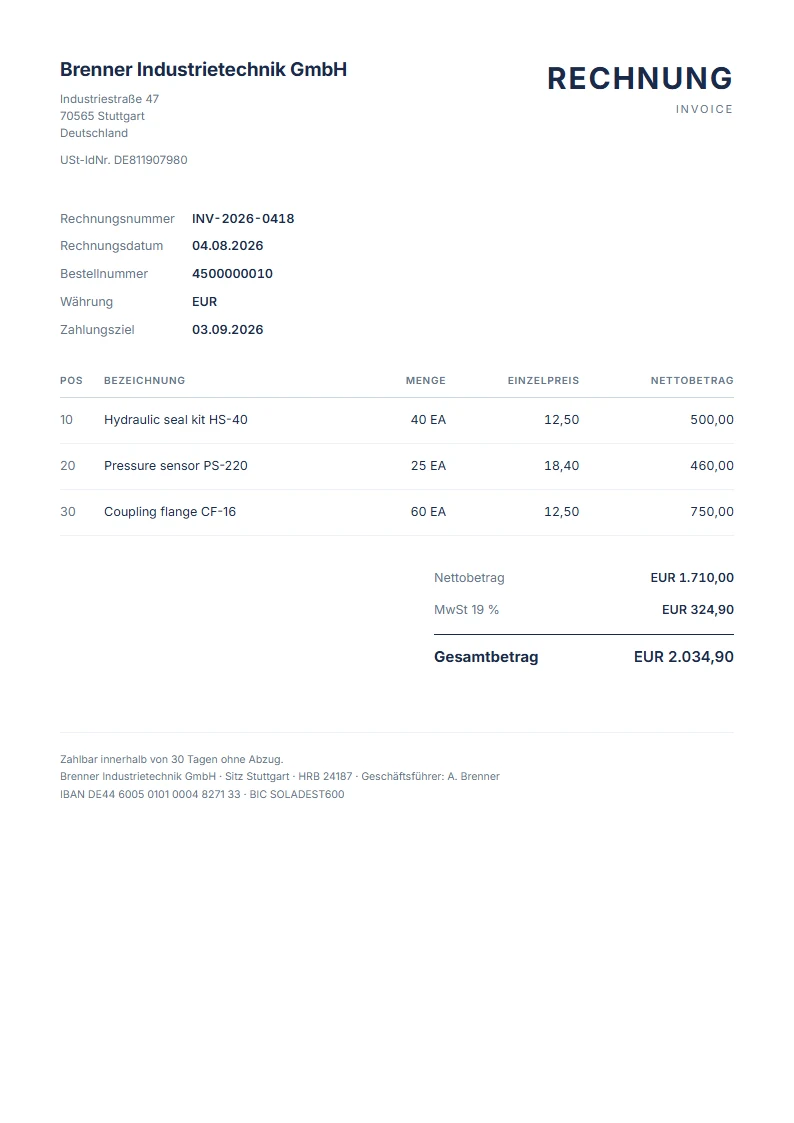 Supplier invoice
- Vendor
- Brenner Industrietechnik GmbH
- Invoice
- INV-2026-0418
- Purchase order
- 4500000010
- Net amount
- EUR 1,710.00
- VAT 19%
- EUR 324.90
- Total
- EUR 2,034.90
- Fields extractedSAP Document Information Extraction
- Tax check passedGermany · VAT
- 3-way matchPO → GR → Invoice
- ApprovedAP approver · Fiori
- Posted to S/4HANASupplier invoice + audit entry
The gap
AP work lives between the inbox and SAP
Extraction alone does not close an invoice. The time goes into everything after it: checking the PO, waiting on the goods receipt, confirming tax, finding the right approver and keying the posting.
Invoices wait in mailboxes
PDFs, scans and e-invoices arrive in shared inboxes and are forwarded, printed or re-keyed before anyone can act on them.
Matching is done by hand
Quantities, prices and amounts are compared line by line against the PO and goods receipt in separate SAP screens.
Exceptions lose their context
A missing GR or a price variance turns into an email thread. The decision and its reason rarely make it back to the invoice.
How it executes
Five steps, one record of every decision
Every invoice moves through the same chain. Each step leaves a status your team can see and an entry in the audit trail.
- 01
Read
Invoices are captured from a monitored mailbox. SAP Document Information Extraction reads header and line items; an intelligent fallback with OCR covers scans and low-confidence documents. Every field carries a confidence score.
- 02
Validate
Business rules and tax checks run against the extracted data: supplier tax ID format, applicable rate and jurisdiction-specific requirements, returned as Compliant, Warning or Non-compliant.
- 03
Reconcile
Lines are matched against the purchase order and goods receipt in S/4HANA, two-way or three-way, with quantity, price and amount compared per line.
- 04
Resolve
Mismatches, missing goods receipts and failed postings surface as exceptions in a Fiori worklist, with the source document beside the data so the reviewer can decide in one place.
- 05
Post
After a named approver signs off, DocuSync posts the supplier invoice to S/4HANA through the standard SAP API and records the resulting document number.
Product tour
Built for the people who close the invoice
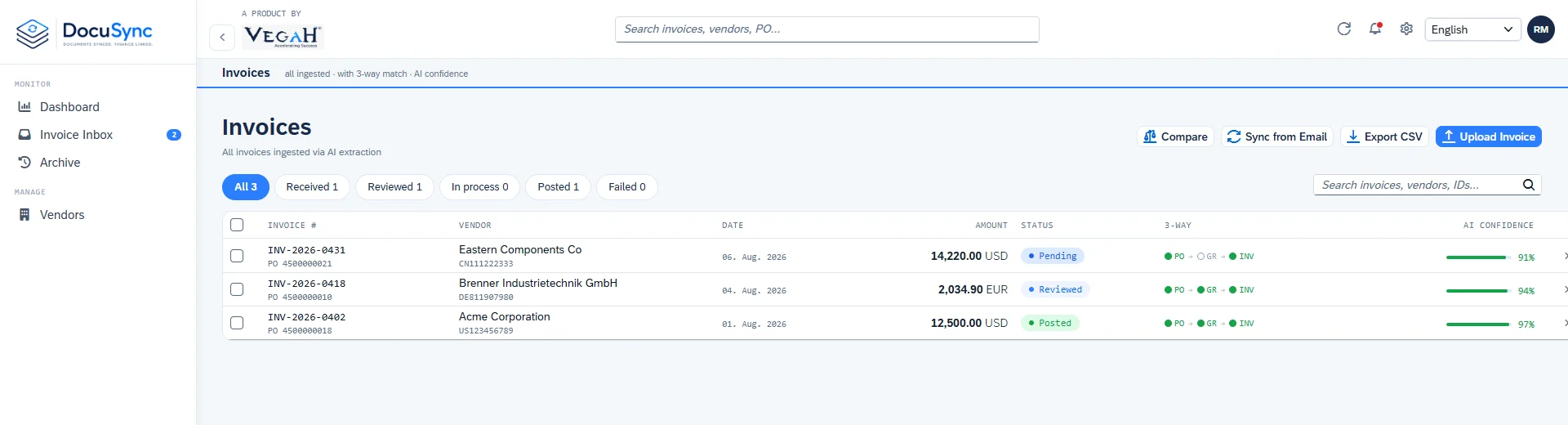
An SAP Fiori interface for AP clerks and approvers: one inbox, the source PDF beside the extracted data, and the match and tax result on the same screen.
One worklist for every incoming invoice
Status, supplier, amount and confidence for each invoice, filterable by what needs your attention.
Demo environment · sample data
Capabilities
What DocuSync does today
Email and PDF capture
Monitored mailbox ingestion of PDF and scanned invoices.
SAP Document Information Extraction
SAP's own extraction service as the primary reader.
Intelligent fallback
Pattern engine and OCR take over when extraction is unavailable or uncertain.
Confidence scoring
Per-field and per-document confidence shown to the reviewer.
PO and goods receipt validation
Checks against purchase orders and goods receipts in S/4HANA.
Two-way and three-way matching
Line-level quantity, price and amount comparison.
Tax and business-rule validation
Jurisdiction-specific checks for ten tax regimes.
Fiori review and approval
Approve, reject or hold with the evidence on screen.
Supplier invoice posting
Posted to S/4HANA through standard SAP APIs.
Complete audit trail
One record per status change: who, when and the resulting document.
SAP-native by design
Deploys inside your SAP BTP landscape
DocuSync is built on the SAP Cloud Application Programming Model and deployed as a dedicated instance in your SAP BTP subaccount, connected to S/4HANA through standard SAP APIs.
Built with
- SAP BTP · Cloud Foundry
- SAP CAP · Node.js
- SAP Fiori elements
- SAP Document Information Extraction
- SAP HANA Cloud
- XSUAA
- S/4HANA OData APIs
Tax validation coverage
Jurisdiction-specific checks are built in for:
- Germany
- France
- Netherlands
- Spain
- Italy
- United Kingdom
- United States
- India
- Japan
- China
Invoice data stays in SAP services
Extraction runs through SAP Document Information Extraction. No third-party AI provider sits in the invoice data path.
Your identity, your roles
Access runs through SAP Authorization and Trust Management. Viewer and Approver roles are enforced at the service layer, not only in the UI.
Standard interfaces
Supplier invoices are posted through API_SUPPLIERINVOICE_PROCESS_SRV and purchase orders read through API_PURCHASEORDER_PROCESS_SRV.
Dedicated deployment
A single-tenant instance per customer on SAP BTP, Cloud Foundry, with SAP HANA Cloud in production.
Getting started
See DocuSync on your own invoices
We start with a Proof of Value on your landscape and your invoices, so the decision is made on your data. Talk to us about scope and timing.
How it works
The execution chain, in detail
What happens to an invoice at each step, which status it carries, and where a person stays in control.
- 01Read
- 02Validate
- 03Reconcile
- 04Resolve
- 05Post
- 01
Read
Invoices are captured from a monitored mailbox. SAP Document Information Extraction reads header and line items; an intelligent fallback with OCR covers scans and low-confidence documents. Every field carries a confidence score.
- 02
Validate
Business rules and tax checks run against the extracted data: supplier tax ID format, applicable rate and jurisdiction-specific requirements, returned as Compliant, Warning or Non-compliant.
Tax result
- COMPLIANTTax ID, rate and jurisdiction rules pass.
- WARNINGPasses with something a reviewer should confirm.
- NON_COMPLIANTFails a rule and is held for review.
- 03
Reconcile
Lines are matched against the purchase order and goods receipt in S/4HANA, two-way or three-way, with quantity, price and amount compared per line.
Match result
- MATCHEDPO, goods receipt and invoice agree line by line.
- PARTIALSome lines agree; the rest need review.
- MISMATCHQuantity, price or amount differs from the PO or GR.
- PENDING_GRPO matches but the goods receipt is not posted yet.
- NO_PONo purchase order reference found on the invoice.
- 04
Resolve
Mismatches, missing goods receipts and failed postings surface as exceptions in a Fiori worklist, with the source document beside the data so the reviewer can decide in one place.
- 05
Post
After a named approver signs off, DocuSync posts the supplier invoice to S/4HANA through the standard SAP API and records the resulting document number.
A person approves every posting
DocuSync prepares the decision; an approver makes it. Posting to S/4HANA is an Approver action enforced at the service layer, and every approval, rejection and posting is written to the invoice's status history with the user and timestamp.
Viewer
Read-only access to invoices, match and tax results, and history.
Approver
Review, approve, reject, run matching and post to S/4HANA.
Architecture
Deploys inside your SAP BTP landscape
From the inbox to a posted FI-AP document: where each step runs and which SAP services it uses.
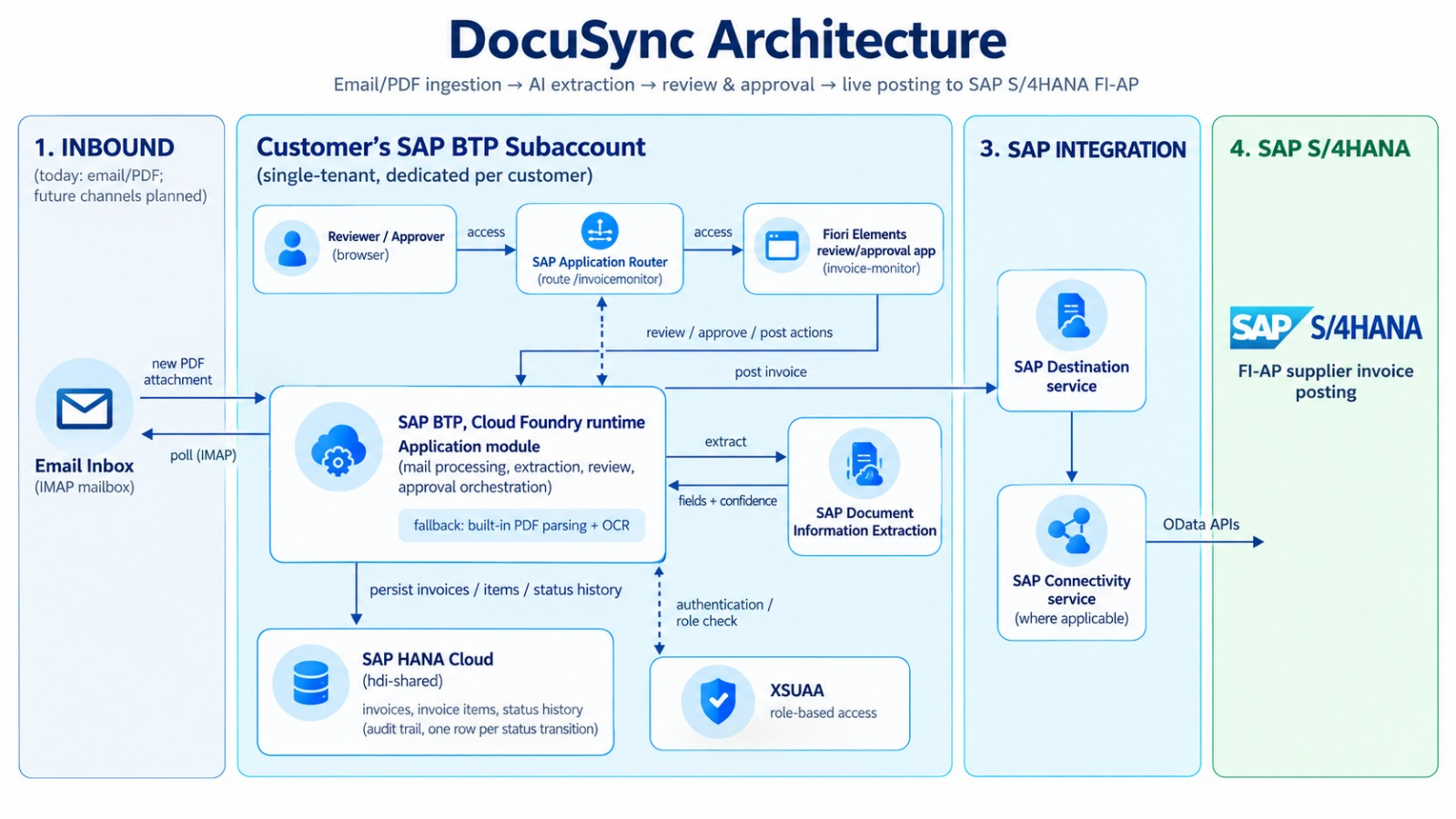 Full size
ROI calculator
Estimate the AP effort DocuSync could return
Enter your own figures. The starting values are placeholders, not benchmarks. Replace each one with what you see in your AP team today.
Amounts are in US dollars. Switching currency converts every amount at the reference rate. Reference rate of 16 nov. 2026 from ExchangeRate-API.
Your invoice volume
How you work today
Your estimate with DocuSync
Running cost
FAQ
Questions buyers ask us
What is DocuSync?
Intelligent AP execution for SAP. DocuSync captures supplier invoices from email, extracts them with SAP Document Information Extraction, validates them against purchase orders, goods receipts and tax rules, and posts approved invoices to SAP S/4HANA with a full audit trail.
Which SAP systems does it work with?
SAP S/4HANA today, through the standard API_SUPPLIERINVOICE_PROCESS_SRV and API_PURCHASEORDER_PROCESS_SRV OData services. SAP ECC is covered by a documented migration path that has not yet been validated on a live ECC system; talk to us if ECC is your landscape.
Where does DocuSync run?
It deploys inside your SAP BTP landscape as a dedicated, single-tenant instance on the Cloud Foundry runtime, with SAP HANA Cloud in production. VEGAH provides and supports the product; your BTP subaccount is the deployment target.
Does invoice data go to a third-party AI provider?
No. Extraction runs through SAP Document Information Extraction, SAP's own service. The fallback pattern engine and OCR run inside the DocuSync application.
Does anything post to SAP without a person?
No. Every posting to S/4HANA is an approver action. DocuSync prepares the match, tax result and evidence; a user with the Approver role makes the decision.
How is access controlled?
Through SAP Authorization and Trust Management (XSUAA) and the identity provider configured in your subaccount. There is no separate DocuSync login. Viewer and Approver roles are enforced at the service layer.
Is there an audit trail?
Yes. Every status transition is recorded with the user, the timestamp and, for postings, the resulting S/4HANA document number, and is visible on the invoice.
Which tax regimes are validated?
Germany, France, the Netherlands, Spain, Italy, the United Kingdom, the United States, India, Japan and China.
How is DocuSync priced?
Pricing is scoped to your invoice volume, entities and landscape. We usually start with a Proof of Value on your own invoices. Contact us for a proposal. SAP BTP consumption is billed by SAP under your BTP contract.
Have a question that is not here?
Ask the DocuSync team